QR Codes for Emergency Contact Cards: What to Include and What to Leave Off
Published 25 November 2026 by the QRCodeBarn team.
An emergency contact card in a wallet, bag or coat pocket helps a stranger reach the right person if something goes wrong and your phone is locked or flat. Adding a QR code can make it quicker to call your contacts and give room for a short note. This guide covers what to put on the card, what to leave off, which type of code to use and how to print and test it so it actually works when needed.
Free printable template
A free wallet-sized card you can print, fill in and keep in a wallet, bag or coat pocket. The front has space for your name and two emergency contacts; the back has a QR code area, short medical notes and a medications list.
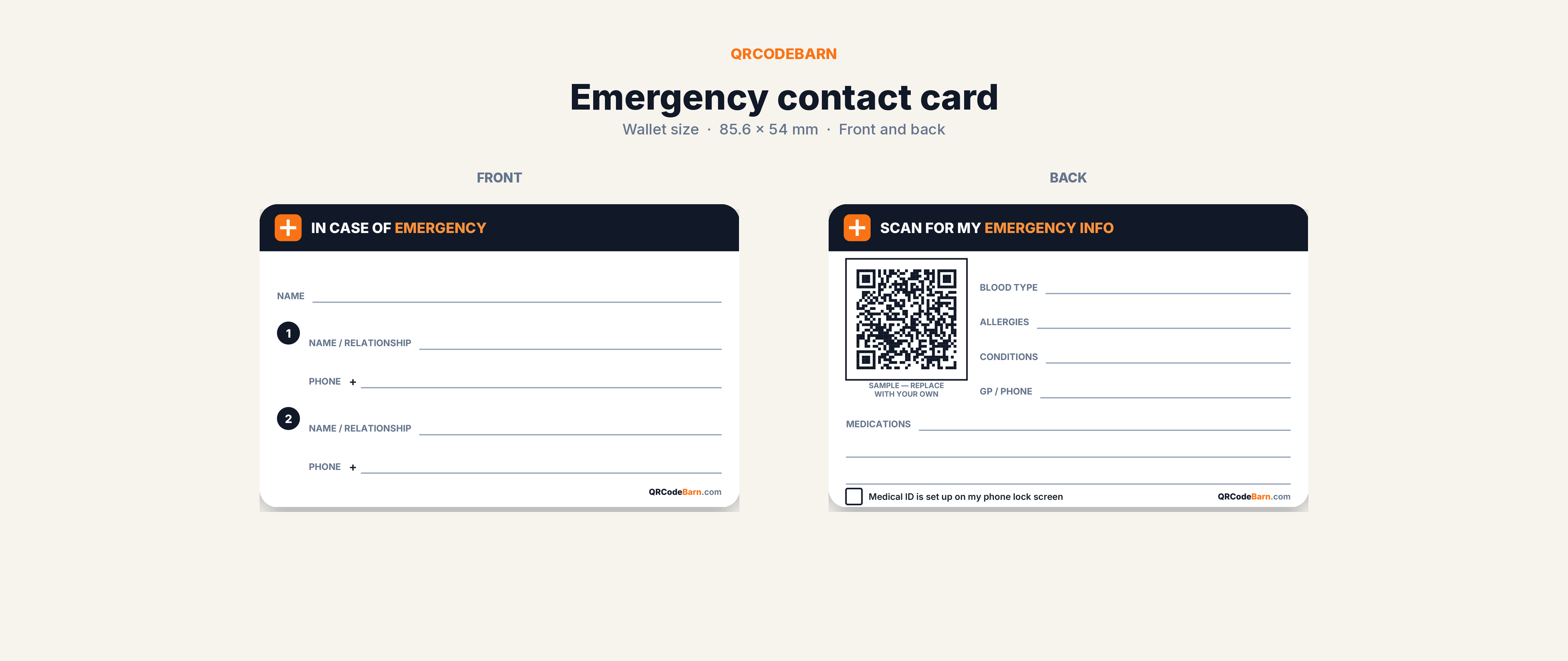
Print at 100% (actual size), not "fit to page". For two-sided printing, flip on the long edge, then cut along the marks.
The short answer
A QR code on an emergency contact card, often called an ICE (In Case of Emergency) card, can hold a short block of text with the names and phone numbers of the people to call, plus a few essential notes. It is a useful extra, not a replacement for writing the same details in plain words. The safest approach is a card that is readable without a phone, with a plain-text QR code on the back that repeats and slightly expands the information, and nothing on it that you would not be happy for a stranger to read.
Why put a QR code on an emergency contact card?
Most of us carry our emergency contacts in a phone that is locked, has a flat battery or is lost in exactly the moment someone else needs them. A small printed card in a wallet, bag, coat pocket or child's school bag gets around that. Adding a QR code to the card has a few practical benefits:
- More room without tiny print. A credit-card-sized card only fits a few lines of readable text. A code can carry a longer note, such as a second contact, a GP surgery number or a short line about how to reach a carer.
- Fewer copying mistakes. If the code contains phone numbers, the person helping can scan it and tap to call rather than reading and dialling eleven digits under stress.
It is worth being realistic about the limits. You cannot count on a passer-by, a steward or a first aider stopping to scan a code, and some people will not have a phone to hand. That is why the printed words come first and the code is the bonus.
What to put on the card, and what to leave off
An emergency card is designed to be read by someone you do not know, so treat everything on it, including whatever is inside the code, as public. Anyone who picks up a dropped wallet can scan it too.
Sensible things to include:
- One or two emergency contacts. A first name and relationship ("Sarah, wife" or "Dad") with a mobile number in full international format, for example +44 7700 900123, so it works if the card is read abroad.
- A short, relevant note. Only what a helper would genuinely need in the first few minutes, such as "I have type 1 diabetes" or "Hearing impaired, please speak clearly". Keep it brief and factual.
- A line about where to find more. For example, "Medical ID is set up on my phone's lock screen" if you have filled that in.
Things best left off:
- Your full home address, which, combined with door keys in the same bag, is an obvious risk.
- Your date of birth, NHS number, bank details or anything used to verify your identity.
- Passwords, PINs or the code for your phone, ever.
- Long medical histories. A helper needs the one or two things that change how they should act, not the whole file.
If you are making a card for a child, think about whether you want their full name on it at all. A parent's first name and number, with "Please call my mum" or "Please call my dad", is often enough.
Text code or link: which type to use
There are three common ways to set this up, and for most people the first is the right one.
A plain-text code. Using a text QR code, you type the information directly into the code. It needs no internet connection, no website and no account, and it cannot be changed or taken offline later. The downside is that you need to print a new card if a number changes. Keep the text short, because the more characters you add, the denser and harder to scan the code becomes. Our article on how much data a QR code can hold explains why a short message scans more reliably.
A phone number code. A phone number QR code opens the dialler with your main contact's number ready to call. It is the quickest option for the person helping, but it only holds one number and no context, so pair it with printed text.
A link to a web page. A website QR code can point to a page with fuller details that you can edit at any time. But the page needs a signal to load, has to stay online, and can be read by anyone with the link. If you go this way, keep the page free of sensitive details and check it still works every few months. The differences are covered in more depth in static vs dynamic QR codes.
How to make the card step by step
- Write the wording first. Draft the printed side and the code text separately. The printed side might read "IN CASE OF EMERGENCY. Please call Sarah (wife) +44 7700 900123". The code might repeat that and add a second contact and one short note.
- Create the code. Open the free QR code generator, choose the text or phone option, paste your wording and generate. Keep strong contrast, dark on light. If you want to use colour, the guide to QR code colours explains which combinations stay scannable.
- Choose a higher error correction level if offered. Cards get bent, scratched and rubbed in pockets, and higher error correction helps a damaged code still scan, at the cost of a slightly denser pattern.
- Size it sensibly. On a wallet card, a code around 2 to 2.5 cm square usually scans from close range if the content is short. Leave a clear white border around it. The QR code size guide covers this in more detail.
- Print, then protect it. Print on thick card, or print on paper and laminate it. A matt laminate is easier to scan than a very glossy one, which can reflect light straight into the camera.
- Test it properly. Scan the printed card with at least two different phones, ideally one iPhone and one Android, and check every number and word that appears. Our guide to testing a QR code has a fuller checklist.
Where to keep it, and keeping it current
A card is only useful if it is found. Good places include the front slot of a wallet or purse, behind your phone in its case, the inside pocket of a walking or cycling jacket, a tag on a child's school bag or a sticker inside a bike helmet. For bags and luggage, the same approach used for lost property tags works well, with the emergency wording on the front.
Winter is a good time to sort one out. Darker evenings, icy pavements and more travel over Christmas and New Year all make it slightly more likely that a stranger needs to contact someone on your behalf. It also makes a thoughtful small gift for an older relative or a teenager starting to travel alone, made together so they choose what goes on it.
Set a reminder to check the card once a year, or whenever someone changes their number. Because a plain-text code cannot be edited, an out-of-date card should be cut up and replaced rather than corrected by hand, since a crossed-out number on the front and the old number in the code will contradict each other.
Pair it with your phone's built-in emergency information
Both iPhone and Android phones let you add emergency contacts and medical notes that can be viewed from the lock screen without unlocking the phone. It takes a few minutes in the settings, and it works alongside a card rather than instead of one, because the card still helps if the phone is dead or missing. If you have set this up, say so on the card so a helper knows to look.
Frequently asked questions
Will paramedics or first aiders scan the QR code?
You cannot rely on it. Someone helping may be busy, may not have a phone to hand or may simply not think to scan it. That is why the essential contact details should always be printed in plain words on the card, with the code as an extra.
Is it safe to put medical information in a QR code?
Treat anything in the code as public, because anyone who finds the card can scan it. Keep it to the one or two facts a helper would need straight away, and leave off identity details such as your date of birth, address or NHS number.
Does a text QR code need the internet to work?
No. A plain-text code stores the words inside the pattern itself, so the phone shows them straight away without a signal. A code that links to a web page does need a connection to load the page.
What if one of my contacts changes their number?
A plain-text code cannot be edited, so make and print a new card and destroy the old one. Checking the card once a year is a good habit.
This article was drafted with AI assistance and reviewed for accuracy. Read our editorial policy and AI content policy.